SMS OTP with Embedded Wallets
SMS OTP sends a one-time passcode to the user's phone number. Choose the default connection for the quickest setup, or create a custom connection when you want the phone field and OTP to stay inside the modal instead of a popup.
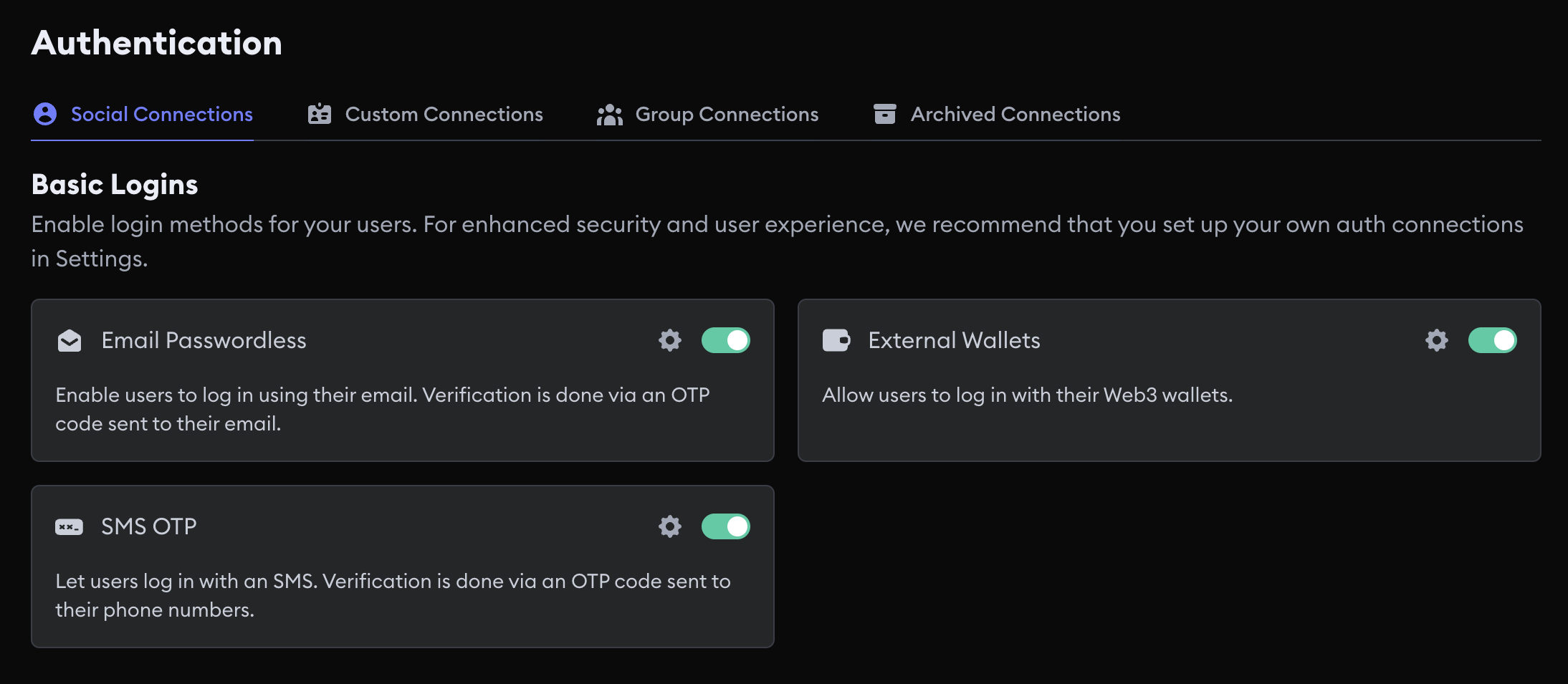
Default SMS OTP
The default connection uses the SMS OTP service managed by Embedded Wallets. Enable SMS OTP and the SDK reads it from the dashboard. You don't add an Auth Connection ID.
Caveats
- With the modal, the user enters their phone number and OTP in a popup, not in the modal itself.
- The default connection and a custom SMS connection are separate connections, so they produce different wallet addresses for the same person unless you link them with a group connection.
Configure the default connection
- Open your project in the MetaMask Developer Dashboard.
- Select Social Connections.
- Enable SMS OTP.
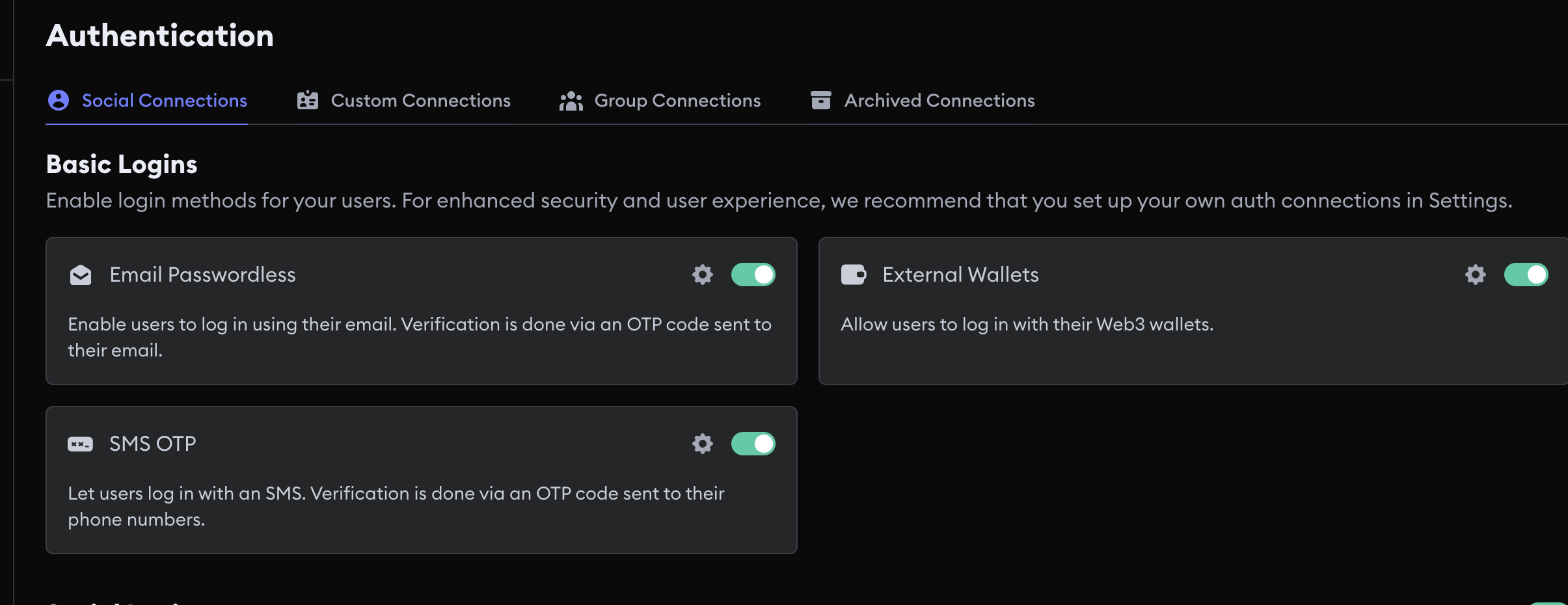
You can restrict SMS by country in Access control.
Custom SMS OTP
A custom SMS connection on the dashboard is only an identifier. You don't paste a Twilio key, an OAuth client ID, or a JWT JWKS URL. You create the connection, copy the Auth Connection ID, and pass that ID in your SDK configuration.
Default SMS login opens a popup so the user can enter their phone number and OTP.
When you attach your Auth Connection ID to sms_passwordless in modalConfig.loginMethods, that
input stays inside the modal.
Decide between the default and a custom connection before you onboard users. Moving from the default SMS connection to a custom SMS connection changes every user's wallet address unless both connections are in a group connection with matching user identifiers.
Create the connection
- Open Social Connections in the MetaMask Developer Dashboard.
- Select the settings icon next to SMS OTP.
- Enter an Auth Connection ID.
- Select Add Connection.
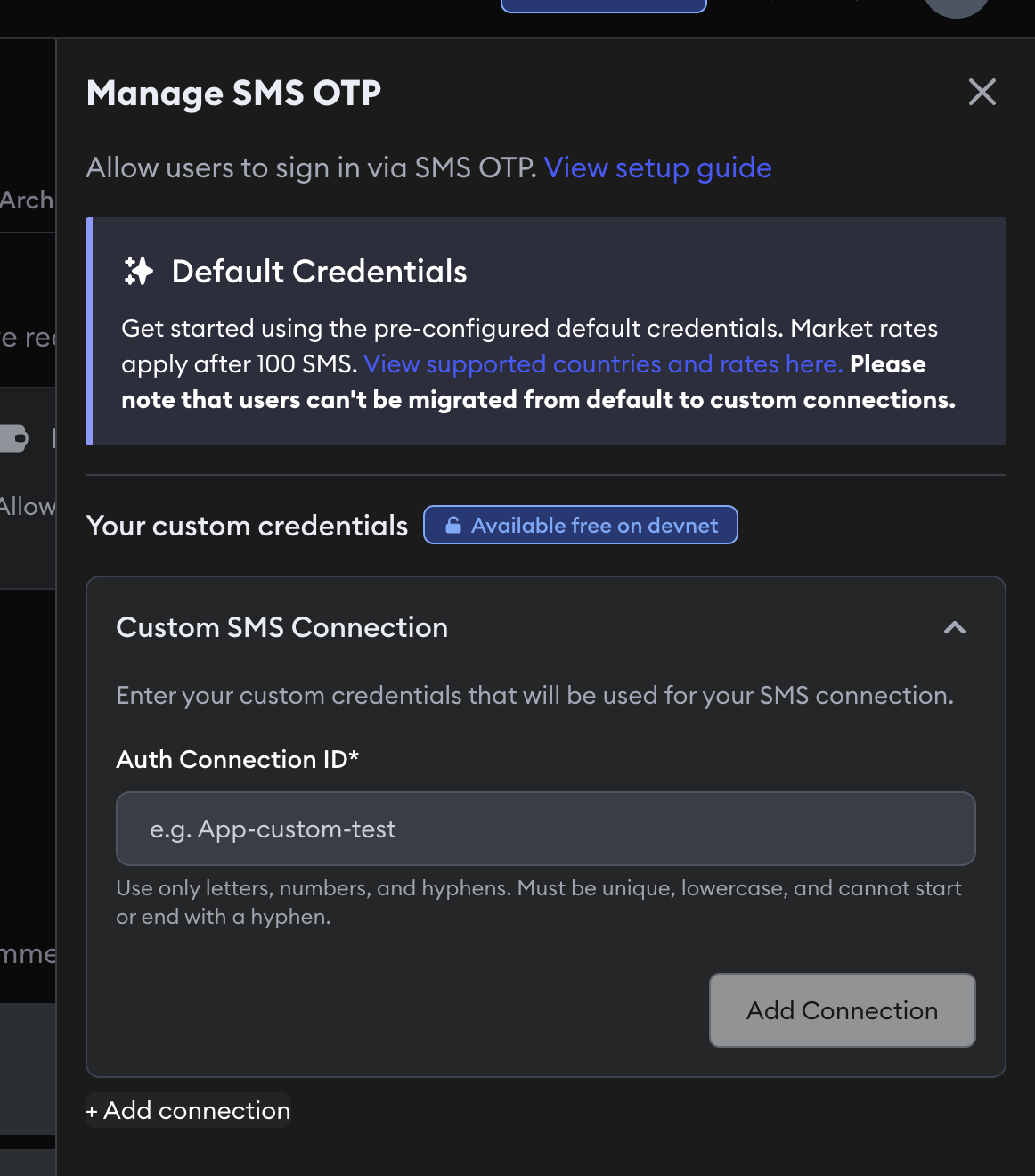
There are no other fields. If you already issue SMS OTPs from your own backend, use a custom JWT connection instead of this dashboard identifier.
Group SMS connections
A group connection gives the same person one wallet address across several login methods.
Default SMS and a custom SMS connection are separate. They produce different wallet addresses unless you group them and every connection in the group uses the same JWT user identifier. SMS often doesn't share an email address with Google or email passwordless, so grouping only works if you normalize a stable identifier.
Pass both the child connection ID and grouped connection ID when you bypass the modal:
await connectTo(WALLET_CONNECTORS.AUTH, {
  authConnection: AUTH_CONNECTION.SMS_PASSWORDLESS,
  authConnectionId: '<SMS_AUTH_CONNECTION_ID>',
  groupedAuthConnectionId: '<GROUPED_AUTH_CONNECTION_ID>',
  extraLoginOptions: {
    login_hint: '+1-555-555-0100',
  },
})
Usage examples
Use login_hint for the phone number when you call connectTo.
For the modal, pass the Auth Connection ID in loginMethods so the flow stays in the modal.
Default implicit flow
Pass the user's phone number as login_hint. The default connection opens a popup for the OTP step.
- React
- Vue
- JavaScript
- React Native
- Android
- iOS
- Flutter
import { AUTH_CONNECTION, WALLET_CONNECTORS } from '@web3auth/modal'
import { useWeb3AuthConnect } from '@web3auth/modal/react'

const { connectTo } = useWeb3AuthConnect()

await connectTo(WALLET_CONNECTORS.AUTH, {
  authConnection: AUTH_CONNECTION.SMS_PASSWORDLESS,
  extraLoginOptions: {
    login_hint: '+1-555-555-0100',
  },
})
import { AUTH_CONNECTION, WALLET_CONNECTORS } from '@web3auth/modal'
import { useWeb3AuthConnect } from '@web3auth/modal/vue'

const { connectTo } = useWeb3AuthConnect()

await connectTo(WALLET_CONNECTORS.AUTH, {
  authConnection: AUTH_CONNECTION.SMS_PASSWORDLESS,
  extraLoginOptions: {
    login_hint: '+1-555-555-0100',
  },
})
import { AUTH_CONNECTION, WALLET_CONNECTORS } from '@web3auth/modal'

await web3auth.connectTo(WALLET_CONNECTORS.AUTH, {
  authConnection: AUTH_CONNECTION.SMS_PASSWORDLESS,
  extraLoginOptions: {
    login_hint: '+1-555-555-0100',
  },
})
import { AUTH_CONNECTION, useWeb3AuthConnect } from '@web3auth/react-native-sdk'

const { connectTo } = useWeb3AuthConnect()

await connectTo({
  authConnection: AUTH_CONNECTION.SMS_PASSWORDLESS,
  extraLoginOptions: {
    login_hint: '+1-555-555-0100',
  },
})
val response = web3Auth.connectTo(
    LoginParams(
        AuthConnection.SMS_PASSWORDLESS,
        loginHint = "+1-555-555-0100"
    )
)
let response = try await web3Auth.connectTo(
    loginParams: LoginParams(
        authConnection: .SMS_PASSWORDLESS,
        loginHint: "+1-555-555-0100"
    )
)
final response = await Web3AuthFlutter.login(
  LoginParams(
    loginProvider: Provider.sms_passwordless,
    extraLoginOptions: ExtraLoginOptions(
      login_hint: '+1-555-555-0100',
    ),
  ),
);
Custom connection in the modal
Add the Auth Connection ID from the dashboard to loginMethods. The email or phone field and OTP stay inside the modal instead of a popup.
- React
- Vue
- JavaScript
import { WALLET_CONNECTORS, WEB3AUTH_NETWORK } from '@web3auth/modal'
import { type Web3AuthContextConfig } from '@web3auth/modal/react'

const web3AuthContextConfig: Web3AuthContextConfig = {
  web3AuthOptions: {
    clientId: 'YOUR_WEB3AUTH_CLIENT_ID',
    web3AuthNetwork: WEB3AUTH_NETWORK.SAPPHIRE_MAINNET,
    modalConfig: {
      connectors: {
        [WALLET_CONNECTORS.AUTH]: {
          label: 'auth',
          loginMethods: {
            sms_passwordless: {
              name: 'SMS passwordless login',
              authConnectionId: '<AUTH_CONNECTION_ID>',
            },
          },
        },
      },
    },
  },
}
import { WALLET_CONNECTORS, WEB3AUTH_NETWORK } from '@web3auth/modal'
import { type Web3AuthContextConfig } from '@web3auth/modal/vue'

const web3AuthContextConfig: Web3AuthContextConfig = {
  web3AuthOptions: {
    clientId: 'YOUR_WEB3AUTH_CLIENT_ID',
    web3AuthNetwork: WEB3AUTH_NETWORK.SAPPHIRE_MAINNET,
    modalConfig: {
      connectors: {
        [WALLET_CONNECTORS.AUTH]: {
          label: 'auth',
          loginMethods: {
            sms_passwordless: {
              name: 'SMS passwordless login',
              authConnectionId: '<AUTH_CONNECTION_ID>',
            },
          },
        },
      },
    },
  },
}
import { Web3Auth, WALLET_CONNECTORS, WEB3AUTH_NETWORK } from '@web3auth/modal'

const web3auth = new Web3Auth({
  clientId: 'YOUR_WEB3AUTH_CLIENT_ID',
  web3AuthNetwork: WEB3AUTH_NETWORK.SAPPHIRE_MAINNET,
  modalConfig: {
    connectors: {
      [WALLET_CONNECTORS.AUTH]: {
        label: 'auth',
        loginMethods: {
          sms_passwordless: {
              name: 'SMS passwordless login',
              authConnectionId: '<AUTH_CONNECTION_ID>',
            },
        },
      },
    },
  },
})
Custom implicit flow
When you bypass the modal, pass the same Auth Connection ID together with login_hint.
- React
- Vue
- JavaScript
- React Native
- Android
- iOS
- Flutter
import { AUTH_CONNECTION, WALLET_CONNECTORS } from '@web3auth/modal'
import { useWeb3AuthConnect } from '@web3auth/modal/react'

const { connectTo } = useWeb3AuthConnect()

await connectTo(WALLET_CONNECTORS.AUTH, {
  authConnection: AUTH_CONNECTION.SMS_PASSWORDLESS,
  authConnectionId: '<AUTH_CONNECTION_ID>',
  extraLoginOptions: {
    login_hint: '+1-555-555-0100',
  },
})
import { AUTH_CONNECTION, WALLET_CONNECTORS } from '@web3auth/modal'
import { useWeb3AuthConnect } from '@web3auth/modal/vue'

const { connectTo } = useWeb3AuthConnect()

await connectTo(WALLET_CONNECTORS.AUTH, {
  authConnection: AUTH_CONNECTION.SMS_PASSWORDLESS,
  authConnectionId: '<AUTH_CONNECTION_ID>',
  extraLoginOptions: {
    login_hint: '+1-555-555-0100',
  },
})
import { AUTH_CONNECTION, WALLET_CONNECTORS } from '@web3auth/modal'

await web3auth.connectTo(WALLET_CONNECTORS.AUTH, {
  authConnection: AUTH_CONNECTION.SMS_PASSWORDLESS,
  authConnectionId: '<AUTH_CONNECTION_ID>',
  extraLoginOptions: {
    login_hint: '+1-555-555-0100',
  },
})
import { AUTH_CONNECTION, useWeb3AuthConnect } from '@web3auth/react-native-sdk'

const { connectTo } = useWeb3AuthConnect()

await connectTo({
  authConnection: AUTH_CONNECTION.SMS_PASSWORDLESS,
  authConnectionId: '<AUTH_CONNECTION_ID>',
  extraLoginOptions: {
    login_hint: '+1-555-555-0100',
  },
})
val response = web3Auth.connectTo(
    LoginParams(
        AuthConnection.SMS_PASSWORDLESS,
        loginHint = "+1-555-555-0100",
        authConnectionId = "<AUTH_CONNECTION_ID>"
    )
)
let response = try await web3Auth.connectTo(
    loginParams: LoginParams(
        authConnection: .SMS_PASSWORDLESS,
        loginHint: "+1-555-555-0100",
        authConnectionId: "<AUTH_CONNECTION_ID>"
    )
)
final response = await Web3AuthFlutter.login(
  LoginParams(
    loginProvider: Provider.sms_passwordless,
    // Configure loginConfig with your Auth Connection ID during initialization.
    extraLoginOptions: ExtraLoginOptions(
      login_hint: '+1-555-555-0100',
    ),
  ),
);